supplier audit process flowchart, supplier audit flowchart, audit flow, audit lifecycle, audit statuses, audit status, drafted, pending, declined, scheduled, on going, conducted, closed, self audit, on site audit, remote audit, leader, approver, co-auditor, corrective actions, close conditions, audit process
OVERVIEW
This guide explains the full lifecycle of a supplier audit in Kiuey: the three phases (Plan & Schedule, Execute, Review & Close), the role responsible for each action and how the status changes along the way.
Who is this for? Internal usersSuppliers
IMPORTANT NOTES
- Only an internal user who is not a Viewer can create an audit.
- The Approver can reopen a declined audit a maximum of 2 times.
- PDF and Acknowledge are available at any time and never block the flow.
- A Self Audit is completed only by the Leader and has its own rules for dates, files and review.
WHO CAN DO THIS
Creator (internal user): Creates the audit and can save it as a draft or launch it.
Leader: Accepts or declines the dates, creates and closes corrective actions.
Approver: Accepts dates, completes the form, requests and accepts corrective actions and closes the audit.
Co-auditor: Helps complete the audit form.
System: Updates the statuses automatically.
Steps
1
View the full audit flowchart
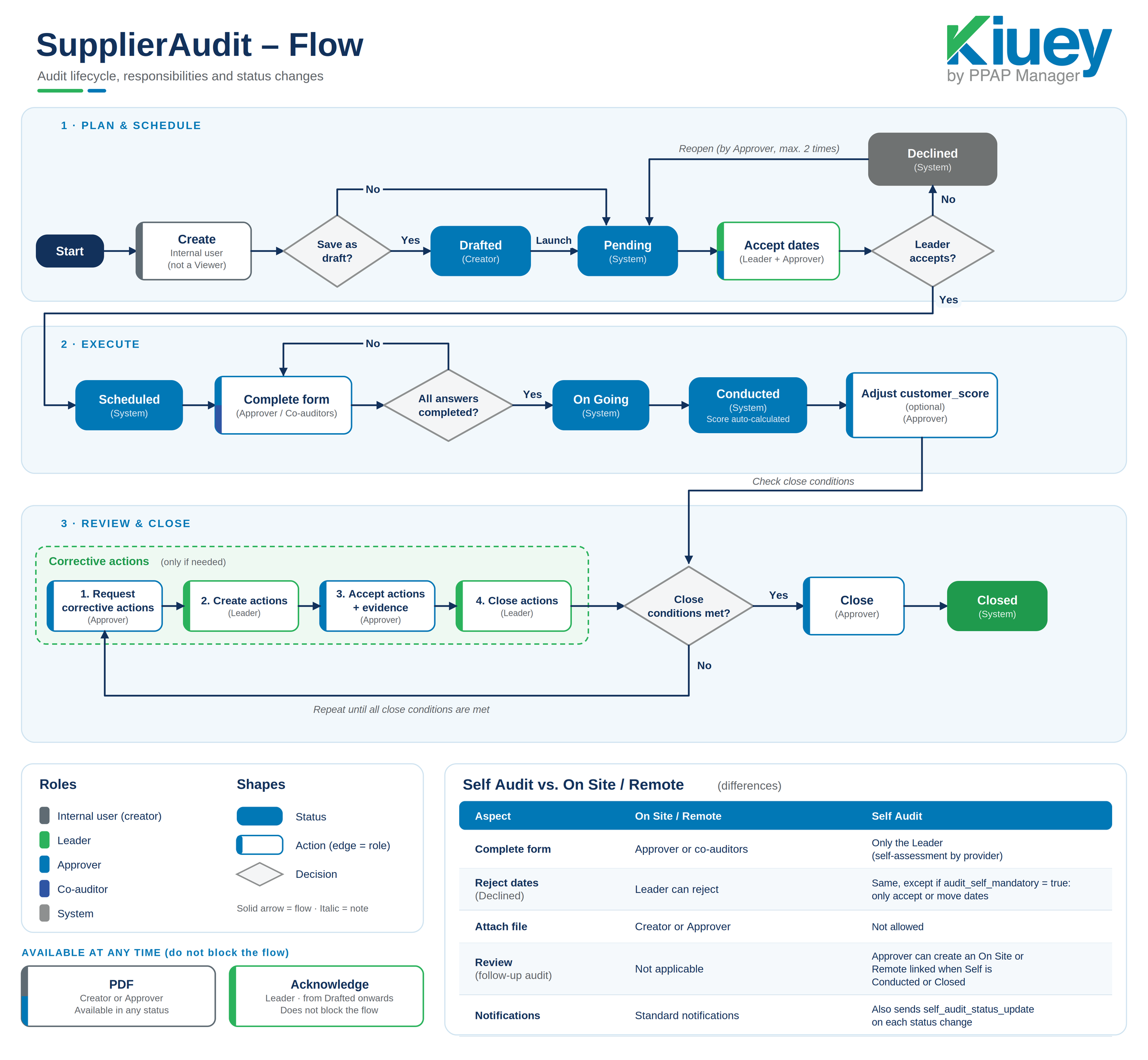
The flowchart below shows the complete lifecycle of a supplier audit: who does what, and how the status changes from Drafted to Closed. Use it as a reference while following the phases.
2
Phase 1 · Plan & Schedule
An internal user (not a Viewer) creates the audit. It can be saved as Drafted or launched right away, which moves it to Pending. The Leader and the Approver then accept the dates. If the Leader declines, the audit becomes Declined and the Approver can reopen it (maximum 2 times). Once the dates are accepted, the audit becomes Scheduled.
3
Phase 2 · Execute
The Approver or the Co-auditors complete the audit form. The status changes to On Going and, when every answer is completed, to Conducted. The score is calculated automatically, and the Approver can optionally adjust the customer_score.
4
Phase 3 · Review & Close
The Approver checks the close conditions. If corrective actions are needed: (1) the Approver requests them, (2) the Leader creates the actions, (3) the Approver accepts the actions and their evidence, and (4) the Leader closes the actions. Repeat until all close conditions are met, then the Approver closes the audit and its status becomes Closed.
5
Use the actions available at any time
These actions do not block the flow. PDF: the Creator or the Approver can generate it in any status. Acknowledge: the Leader can use it from Drafted onwards.
6
Know the Self Audit differences
A Self Audit follows the same flow as an On Site / Remote audit, with these differences:
- Complete form: only the Leader (self-assessment by the provider), instead of the Approver or co-auditors.
- Reject dates: the Leader can reject, except when audit_self_mandatory = true: then the Leader can only accept or move the dates.
- Attach file: not allowed (On Site / Remote: Creator or Approver).
- Review (follow-up audit): the Approver can create a linked On Site or Remote audit when the Self Audit is Conducted or Closed.
- Notifications: standard ones, plus self_audit_status_update on each status change.
Need more help?
If you have any questions or concerns, please contact Kiuey Support by submitting a ticket or through any of our support channels. Our team will be happy to assist you.